There are no release notes for March 2026.
If you missed our previous release notes, read them here. Questions? Email support@cvc.edu
Term Transcript Dashboard
Home Colleges can now take advantage of the Term Transcript Dashboard to determine if and when transcripts were sent for any students who used the CVC Exchange to enroll in a course. In a future release, students' Home College SIS IDs will be included in the report to help expedite transcript evaluation. Please note, only Admissions & Records accounts can view the student's date of birth. If your account needs this permission, contact the CVC at support@cvc.edu.
For more information on transcripts, please visit the Processing Transcripts webpage.
If you missed our previous release notes, read them here. Questions? Email support@cvc.edu
There are no release notes for January 2026.
If you missed our previous release notes, read them here. Questions? Email support@cvc.edu
After user feedback, the following data elements are now available on the downloadable reports.
Financial Aid Report:
Term Transcript Report:
Nelnet Payment Status Updates
If your college uses Nelnet as the payment processor for Exchange payments, CVC has worked with our development partners to establish a Nelnet webhook that checks the students' payment status every 6 hours. This was deployed to Production on October 28, 2025. If your college has any questions on student transactions posted on or after this date, please reach out to support@cvc.edu.
Student Authentication Errors
Our support teams have received an uptick in student authentication errors to the Exchange. Authentication is dependent on the CCC Tech Center's SSO Gateway, which for the purposes of the Exchange, requires that the federated CCCID be released as a SAML attribute from the district IdP. If the CCCID is not present or released as another attribute, then the user is blocked from logging into the Exchange. For more information, please refer to the CCC Tech Center's SSO Federated Access Wiki.
If you missed our previous release notes, read them here. Questions? Email support@cvc.edu.
CVC and our partners at N2N continually monitor implemented production environments for outages. When connectivity to your production instance is down for four or more hours, the N2N app support team will notify your district's IT contact. If your district is undergoing scheduled routine maintenance or upgrades, please inform our Support team as we can input a maintenance block to prevent enrollment to and from your district.
Winter and Spring 2026: Open Enrollment
Winter and spring classes are now available for enrollment! If you do not see your college's classes in the search results, email our support team (support@cvc.edu) as they can identify whether your catalog has been imported. As a reminder, classes will only be displayed on the Exchange if an import and open enrollment date have been configured in Session Management. For step-by-step instructions , refer to the Session Management section of the CVC Exchange: Administrator Guide.
If you missed our previous release notes, read them here. Questions? Email support@cvc.edu.
An address verification API is now integrated with the Abbreviated Enrollment Record (AER). Prior to submitting the AER to the Teaching College, students are now required to validate their California address. If the address cannot be verified, the student is prevented from submitting the application to the Teaching College.
New data elements are now available to CVC Exchange Dashboard administrators. When reviewing a single application, the following are now visible:
SuperGlue Workflow Improvements
As of October 8, 2025, the hot fix for the delivery of shared applications is live in production. This will vastly improve the delivery of applications to the shared application staging table. If your college or district is missing applications, please contact support@cvc.edu to reattempt the delivery.
If you missed our previous release notes, read them here. Questions? Email support@cvc.edu.
The California Virtual Campus (CVC) recently rolled out a major upgrade that makes transcript delivery faster, easier, and free between institutions for most cross-enrolling students!
We’ve heard from colleges and students alike: manually processing transcripts for cross-enrolled students is time-consuming and inefficient. That’s why we’ve developed an automated transcript delivery system—built in collaboration with colleges—to eliminate manual steps and improve the student experience.
Starting this summer, transcripts will be automatically sent three weeks after the course end date for colleges integrated with Parchment. Transcripts between colleges will be automatically delivered electronically through XAP (eTranscript California) either as XML/or PDF, or as a secure PDF through Parchment Receive —no manual requests, no delays, and no additional costs. The CVC is covering all associated fees, saving staff time and institutional dollars.
This new process began with a soft launch in June and includes a helpful new Term Transcript Report, available to all Teaching Colleges. Teaching Colleges can use this report to view a complete list of cross-enrolled students and track the status of their transcripts in real time.
Please note: Colleges not yet integrated with Parchment will continue manual transcript processing at the end of each term, using the Term Transcript Report to easily identify cross-enrolled students who need their transcripts delivered to their Home College.
Need help getting started? Training materials and FAQs are available on the CVC Transcript Processing page. The CVC is also hosting a training on Wednesday, September 24 at 3 p.m which will demonstrate the new transcript process and resources– please send your team members to learn more!
The Conductor workflow that delivers shared applications via SuperGlue is in process of an upgrade by the CCC Tech Center. It is unclear how many shared applications have not been delivered due to an issue discovered with the current workflow. If your district is missing a shared application needed for your MIS reports for summer or fall, please contact support@cvc.edu and we will reattempt the delivery.
If you missed our previous release notes, read them here. Questions? Email support@cvc.edu.
Cal-GETC Search
Students (and counselors!) now have the ability to search for courses by Cal-GETC requirement. Please note, in order for the Cal-GETC search button to show, a student must first select a Home College.
Increased DSPS Functionality
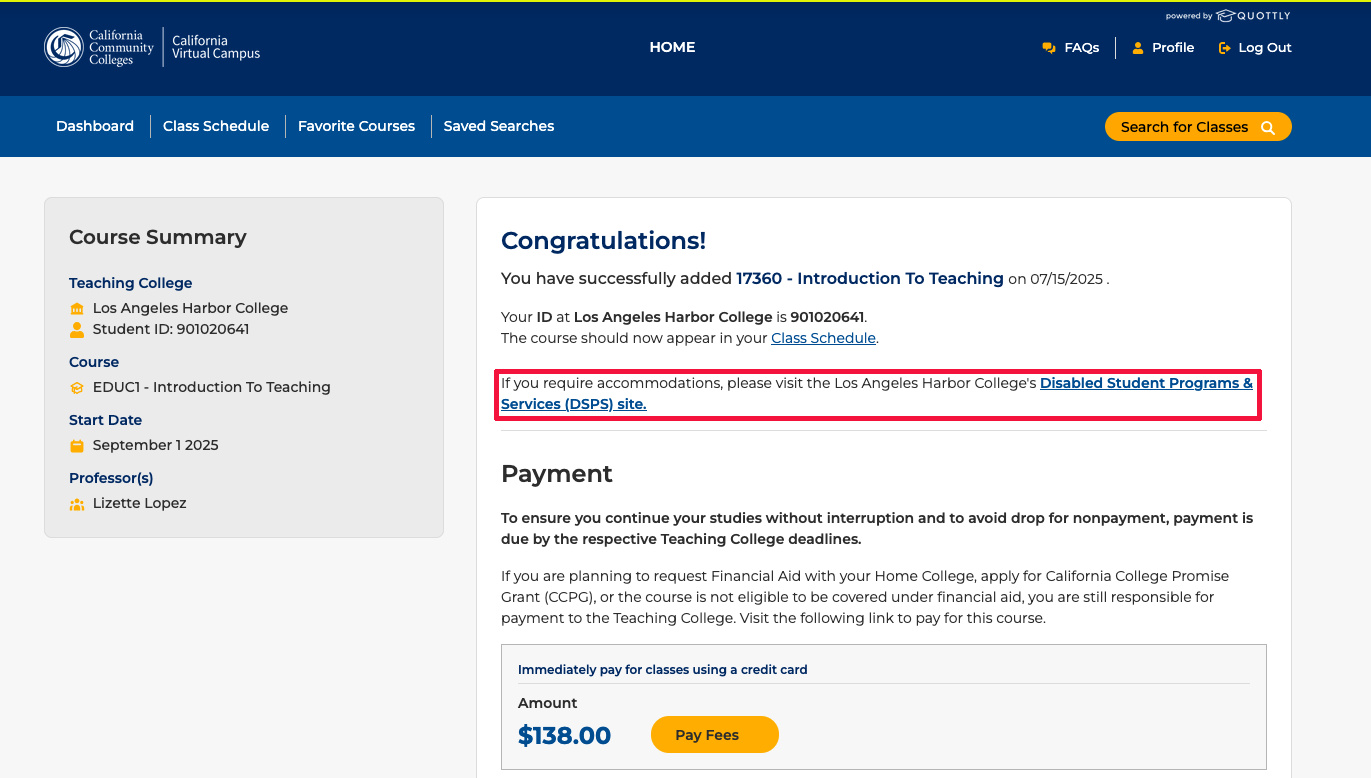
The CVC recently released Exchange functionality which better supports students who require Disability Services and Programs for Students (DSPS) accommodations. When a student successfully cross-enrolls in a course, they will receive a direct link to the Teaching College's DSPS website (see example above). Previously, students had to search for the program's contact information and intake process on their own, which was often confusing and time-consuming. Thank you to the CVC Project Leads for providing the necessary information for this important functionality!
Student Abbreviated Enrollment Record (AER) Data
Based on feedback from colleges, the CVC will now send a student's first name and last name data in Pascal case. This change is intended to help address concerns about potential fraudulent records.
If you missed our previous release notes, read them here. Questions? Email support@cvc.edu.
There are no release notes for July 2025. If you missed our previous release notes, read them here. Questions? Email support@cvc.edu.
Tutoring Badge Sunsetted
Post-COVID, the CVC Exchange's tutoring badge has been difficult to verify due to the wide variety of tutoring services and platforms used at the colleges. Additionally, data from student focus groups shows that students do not often factor online tutoring into their enrollment decision.
This spring, the CVC Consortium recommended to the CVC Advisory Committee that the tutoring badge be sunsetted. The change took place in May and leaves the remaining two badges:
Common Course Numbering
The CVC homepage and search landing page (search.cvc.edu) now include information on Common Course Numbering (CCN). On a related note, any Quality Reviewed-badged courses that have been updated due to CCN need to have additional information submitted to ensure badges display correctly. Please share the CCN Course Title Change Request Form with your POCR lead.
Financial Aid Dashboard
We are excited to share that the Financial Aid Dashboard is now sortable by term, status, and request date! Additionally, a downloadable report is now available via .csv file to your email. If you experience issues with downloading or receiving the csv file, please ensure that advisors@quottlyinc.com is added as a safe sender.
If you missed our previous release notes, read them here.
If you have questions or need
help, visit our Support Center

Creative Commons License
This work by California Virtual Campus - Online Education Initiative, a project by the California Community Colleges Chancellor's Office is licensed under a Creative Commons Attribution 4.0 International License. Copyright © 2024 by California Community Colleges Chancellor's Office.